
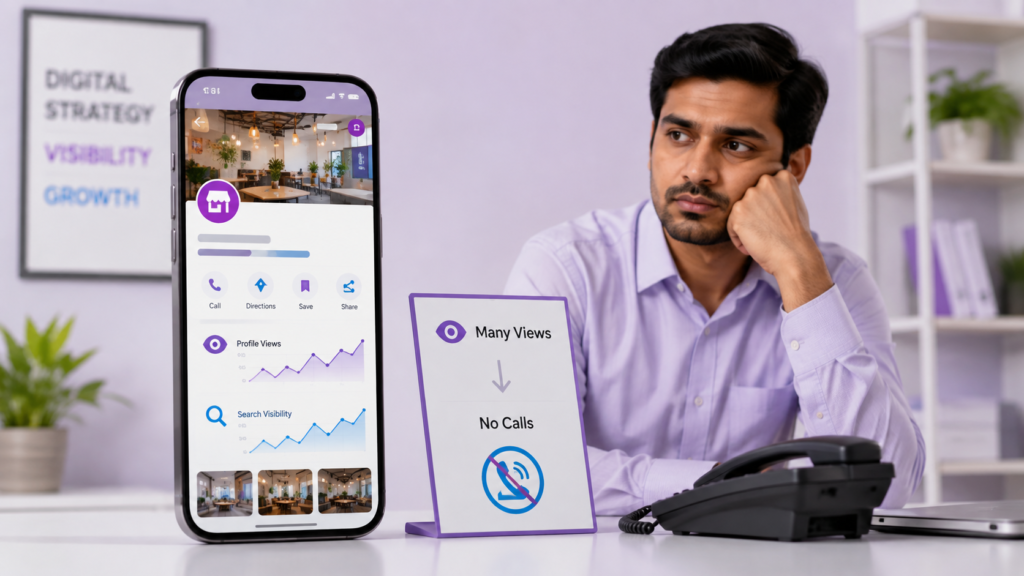
If your Google Business Profile gets views but no calls, you’re not necessarily dealing with a visibility problem.
You can see that people are finding your business on Google, yet those views aren’t turning into calls, enquiries or customers. It is easy to assume that the solution is simply to get more visibility.
But that may not be the real problem.
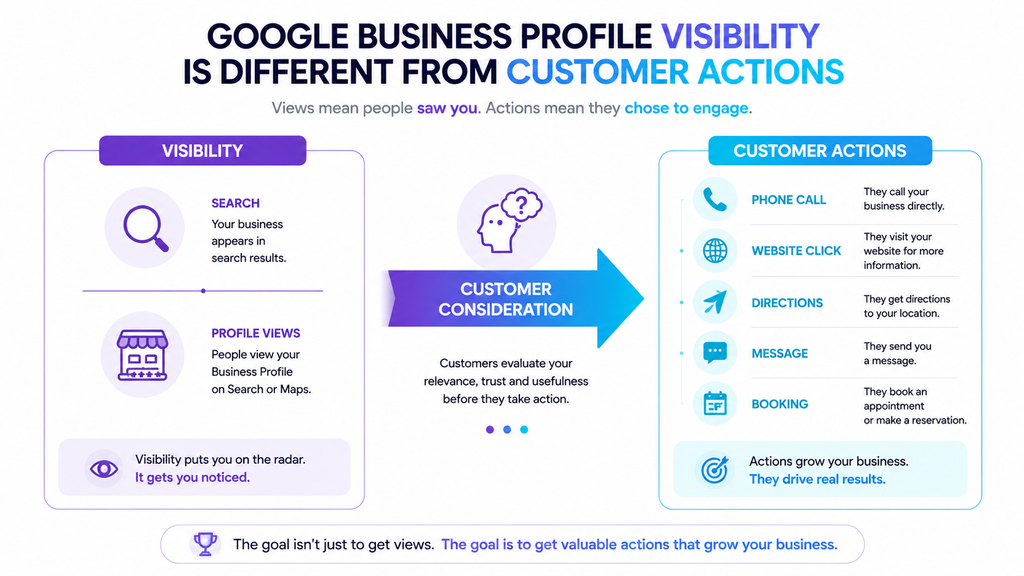
Visibility and customer action are two different things.
Someone can find your business on Google, open your profile, look at your photos and reviews, and still decide not to contact you.
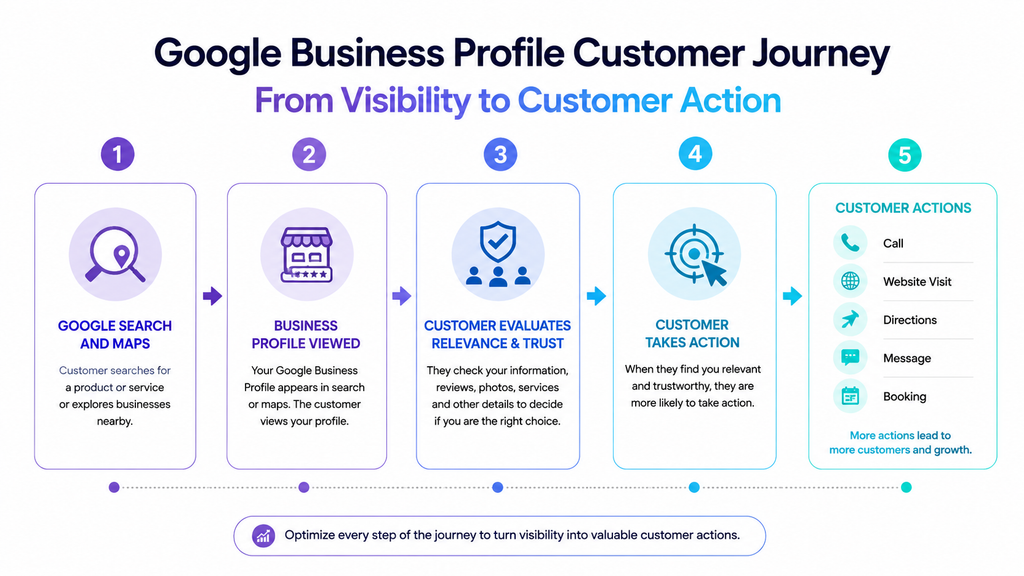
The customer journey is better understood as:
Google visibility → Profile consideration → Customer action
First, the right people need to discover your business. Then they need enough relevant information and trust to consider it. Finally, they need a clear and convenient way to take the next step.
Google’s Business Profile performance reporting separates views and searches from actions such as calls, website clicks, directions, messages and bookings, where those metrics are available. Google defines the Calls metric as the number of times customers clicked the call button on the Business Profile.
So if your Google Business Profile gets views but no calls, don’t immediately assume you need more traffic.
First find out where the customer journey is breaking down.
1. You’re Getting Visibility for the Wrong Searches
One possible reason your Google Business Profile gets views but no calls is that the people finding it are not the customers you actually want.
A profile can appear for searches that are related to your business but have very different levels of commercial intent.
For example, a digital marketing agency might be visible for searches such as:
- “digital marketing”
- “what is digital marketing”
- “digital marketing ideas”
Those searches are related to the industry, but they do not necessarily mean that the person is looking for an agency.
Compare them with:
- “Google Ads agency near me”
- “SEO company for small business”
- “digital marketing agency in Hyderabad”
These searches communicate a much clearer business need.
Google says local results are mainly based on relevance, distance and prominence. Relevance refers to how well a Business Profile matches what someone is searching for.
What should you check?
Look at the search terms shown in your Business Profile performance data.
Ask yourself:
- Are these searches related to the services I actually provide?
- Are they being used by the customers I want?
- Are they mostly informational or commercial?
- Are people finding me for services I don’t want to sell?
Google says the searches metric shows the terms people used to find a Business Profile, although businesses cannot directly manage those queries.
What should you fix?
Make sure your business category, services and business information accurately communicate what your company does.
Don’t add unrelated keywords simply because you want more visibility.
The goal isn’t more random views. The goal is more relevant visibility.
Example
Imagine a home-service company that wants plumbing repair enquiries but receives visibility mainly for broad searches such as “home services.”
The profile may be visible, but the traffic may not be strong enough to produce calls.
The first question should therefore be:
Are the right customers finding me?
Not:
How do I get more views?
2. Your Profile Doesn’t Quickly Explain Why Customers Should Choose You
Getting the right person to your profile is only the beginning.
Once they arrive, the question changes.
They are now asking:
Is this the right business for me?
If your profile doesn’t answer that question quickly, the customer may move on to another business.
A potential customer may want to know:
- What exactly does this business offer?
- Does it provide the service I need?
- Is it suitable for my situation?
- Does it look trustworthy?
- Where is it located?
- How can I contact it?
A profile that simply communicates:
Digital Marketing Agency
doesn’t tell a potential customer much.
A clearer presentation could communicate:
SEO, Google Ads, website design and local digital marketing services for businesses.
The goal is not to fill the profile with promotional slogans.
The goal is to remove uncertainty.
A simple test
Open your Google Business Profile as if you have never heard of your business.
Ask:
If I had a specific problem, would I immediately understand whether this business could help me?
If the answer is no, your profile may have a consideration problem.
Example 1: Dental clinic
Instead of relying only on the label “Dental Clinic,” make sure the profile clearly communicates the services and information that matter to prospective patients.
Example 2: Home-service business
Instead of a vague description such as “Home Services,” make the actual services clear, such as plumbing repair, installation or maintenance, where applicable.
Google allows businesses to provide detailed business information through their Business Profile. Complete and accurate information helps Google understand the business and match it with relevant local searches.
3. Your Reviews Have Ratings but Don’t Give Customers Enough Useful Evidence
A high review rating can create a positive first impression, but the number of stars is not the whole story.
Potential customers may also want to understand what previous customers actually experienced.
Compare these two reviews:
Excellent service. Highly recommended.
and:
The team explained our Google Ads campaign clearly, answered our questions and helped us understand what was being changed.
The second review gives a potential customer more context.
It provides evidence about the actual experience.
What should you check?
Look through your recent reviews and ask:
- Do customers mention the services they used?
- Do reviews describe specific experiences?
- Are there recurring concerns?
- Are you responding professionally?
- Do the reviews help a new customer understand what working with you is like?
Google provides businesses with tools to respond to customer reviews, and service businesses may also have review features that identify specific services or job types.
Google also states that review count and positive ratings can contribute to local prominence.
But don’t make the mistake of turning this into:
Get more five-star reviews and you will get more calls.
That is too simplistic.
Example 1: Restaurant
Weak:
“Good food.”
More useful:
The portions were good, the staff handled our family order well, and the food arrived quickly.
Example 2: Digital marketing agency
Weak:
“Great agency.”
More useful:
They helped us improve our website and explained their SEO recommendations in simple terms.
Don’t manufacture reviews.
Don’t ask customers to write fake experiences.
And don’t manipulate customers into using particular keywords.
Genuine customer experiences are more useful than artificial SEO language.
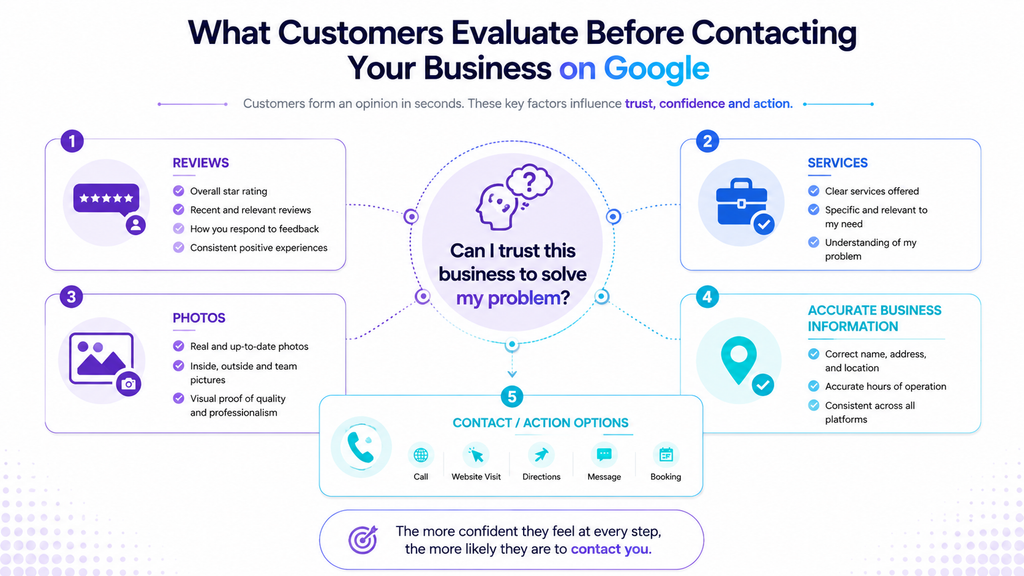
4. Your Services Are Too Vague or Incomplete
If someone opens your profile and still has to figure out what you actually provide, you’ve created unnecessary friction.
Google allows eligible businesses to add services to their Business Profile, group them into categories and add additional details such as descriptions and prices where available. Google also says services may be highlighted when local customers search for an offering.
This is particularly important for service-based businesses.
Imagine two profiles.
Example 1: Digital marketing agency
Vague:
Digital Marketing Services
Clearer:
SEO
Google Ads Management
Local SEO
Website Design
Social Media Marketing
The second presentation makes it easier for a potential customer to identify whether the agency offers what they need.
Example 2: AC service company
Vague:
AC Services
Clearer:
AC Repair
AC Installation
AC Maintenance
AC Gas Refill
The exact services should always match what the business genuinely provides.
What should you check?
Review your service section and ask:
- Are the important services listed?
- Are service names easy for customers to understand?
- Are outdated services still listed?
- Are services grouped logically?
- Do descriptions explain what customers receive?
Don’t turn the services section into a keyword dump.
Clarity is more valuable than stuffing every possible search phrase into your profile.
5. Your Photos Don’t Answer the Customer’s Questions
“Add more photos” is common Google Business Profile advice.
But simply uploading more images isn’t the real objective.
Ask a better question:
What uncertainty does this photo remove?
Google recommends business-specific photos that highlight features customers use when deciding whether to purchase products or services. Google also says profile photos should be in focus, well lit and represent reality without significant alterations or excessive filters.
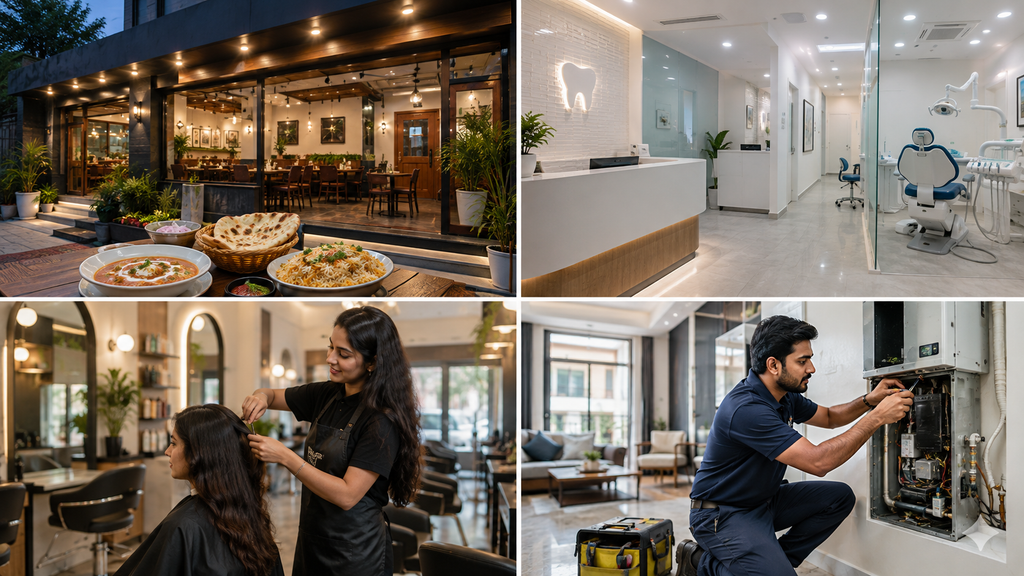
Example 1: Restaurant
A potential customer may want to know:
- What does the restaurant look like?
- What kind of food is served?
- Is there seating?
- What does the entrance look like?
Useful photos could include the exterior, interior, popular dishes and seating area.
Example 2: Clinic
A potential patient may want to know:
- What does the clinic look like?
- Is the environment professional?
- What does the reception area look like?
- What facilities are available?
Authentic photos of the exterior, reception, treatment areas and team can help answer those questions.
Google specifically recommends different types of business photos, including exterior, interior, product, food, service-at-work and team photos depending on the business.
The important distinction
Don’t ask:
How many photos should I upload?
Ask:
What does a first-time customer need to see before feeling comfortable contacting or visiting us?
And if you’re showing customers what your actual business looks like, don’t replace reality with unrealistic AI-generated images.
Google’s photo guidelines specifically say business photos should represent reality.
6. Your Business Information Creates Uncertainty
Sometimes the problem isn’t that your profile is unconvincing.
The problem is that the information creates doubt.
Check:
- Phone number
- Opening hours
- Special hours
- Address
- Service area
- Website
- Business category
- Services
- Relevant business attributes
Google recommends keeping Business Profile information complete and accurate. It also explains that business information can come from multiple sources, including the business, users, public information and other sources.
Example 1
Someone finds your profile at 6:30 PM.
Your profile says you’re open until 8 PM, but your actual business closes at 6 PM.
The customer may decide not to call because they’re unsure whether anyone will answer.
Example 2
Your Google Business Profile shows one phone number while your website shows another.
Even if both eventually reach your business, the inconsistency can create unnecessary uncertainty.
What should you do?
Don’t only check the profile from your business account.
Search for your business as a customer would.
Check the information shown across:
- Google Search
- Google Maps
- Your website
- Important business listings
The goal is simple:
A customer should not have to investigate whether your business information is correct.
7. The Customer Has No Clear or Easy Path to Take Action
Suppose the customer has found the right business.
They understand your service.
They trust the business.
What happens next?
If the next step is unclear or unnecessarily difficult, the customer may leave.
The correct action depends on the business.
Example 1: Emergency plumber
Someone with a leaking pipe probably wants to speak to someone quickly.
For this business, a phone call may be the most important action.
Example 2: Beauty salon
A customer looking for a salon may prefer to book an appointment, visit the website or use an available messaging option.
The point is not:
Every business needs more calls.
The better question is:
What action should a customer take after deciding that this business is suitable?
Google’s Business Profile performance data can include calls, website clicks, directions, messages and bookings, depending on the profile and available features.
Make the preferred action easy.
If customers have to navigate through several pages just to find how to contact you, you’ve added friction to the journey.
8. You’re Measuring Visibility Instead of Business Outcomes
This is one of the easiest mistakes to make.
You open your Business Profile performance report and see:
Views: Increasing
It feels positive.
But then you ask:
Why aren’t we getting customers?
The answer may be that views are increasing while meaningful customer actions are not.
Google’s Business Profile performance reporting separates metrics such as views, searches, calls, website clicks, directions, messages and bookings, where applicable..
These metrics tell you different things.
Example 1: Restaurant
You might see:
Views ↑
Directions ↑
Calls →
That doesn’t automatically mean the profile is failing.
Customers may prefer getting directions rather than calling.
Example 2: Home-service business
You might see:
Views ↑
Website clicks ↑
Calls ↓
That is a reason to investigate the customer journey.
Perhaps the website isn’t making it easy to contact the business.
Perhaps the service offer isn’t clear.
Perhaps the people visiting the profile aren’t the right customers.
The important point
Don’t judge your Google Business Profile only by how many people see it.
Ask:
What actions are those people taking?
And then ask:
Are those actions the ones that matter to my business?
A restaurant, hotel, clinic, plumber and digital marketing agency may all have different primary customer actions.
The right KPI depends on the business model.
9. The Call Path or Lead Process Isn’t Actually Working
This problem is often overlooked.
A business may assume:
Google isn’t sending me calls.
But before blaming visibility, test the complete path yourself.
Search for your business on Google.
Open the Business Profile.
Check the phone number.
Tap the call button.
Make sure it reaches the correct business.
Then ask what happens after the call.
Check these points
- Is the phone number correct?
- Does the call reach the right person?
- Is someone available during the listed business hours?
- Are missed calls followed up?
- Does the person answering understand how to handle enquiries?
- Are genuine leads being recorded?
Google defines the Calls metric as the number of times a customer clicked the call button on your Business Profile.
That is useful information, but a call-button click is not the same thing as a completed sales conversation.
Example 1
A business receives call-button interactions, but nobody answers after 6 PM.
The profile may not be the main problem.
Example 2
A customer calls, but the person answering doesn’t know how to handle enquiries or explain the next step.
Again, improving the profile alone won’t solve the entire problem.
This is why local marketing needs to look beyond rankings and profile views.
The real goal isn’t simply to generate an interaction. It is to create a path from discovery to a useful customer conversation.
A Practical Google Business Profile Diagnosis: What to Check First
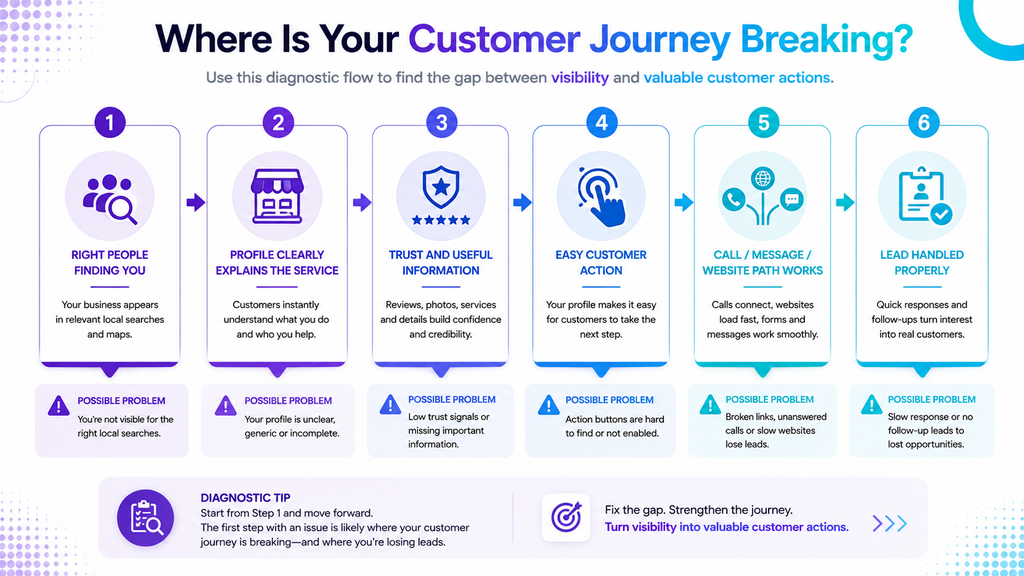
If your Google Business Profile gets views but no calls, don’t change everything at once.
Use a structured diagnosis.
Step 1: Check the searches
Look at the search terms shown in your Business Profile performance data.
Ask:
Are these the searches my ideal customers would actually use?
If the searches are irrelevant or too broad, investigate the profile’s relevance and positioning.
Step 2: Look at your profile as a customer
Forget that you own the business.
Imagine you have never heard of the company.
Can you quickly understand:
- What the business does?
- Where it is?
- What services it provides?
- Why you should consider it?
- How to contact it?
If the answers aren’t obvious, you have identified a potential consideration problem.
Step 3: Compare three competitors
Don’t copy them.
Instead, look for information gaps.
Compare:
- Primary category
- Services
- Reviews
- Photos
- Business information
- Website experience
- Customer-facing details
Ask:
What useful information do these businesses provide that we don’t?
Step 4: Test the phone number
Don’t assume the number works.
Actually test it.
Check whether it reaches the correct business and whether someone answers during the listed hours.
Step 5: Check customer-facing information
Verify:
- Business hours
- Phone number
- Website
- Location
- Services
- Photos
- Important business details
Step 6: Check meaningful actions
Review available data for:
- Calls
- Website clicks
- Directions
- Messages
- Bookings
Don’t look only at views. Google makes these performance metrics available according to the features applicable to each business profile.
Step 7: Find the biggest bottleneck
Once you identify the weakest part of the customer journey, fix that first.
If the profile is attracting irrelevant searches, investigate relevance.
If customers don’t understand your services, improve service clarity.
If customers click through to your website but don’t enquire, investigate the website.
If customers call but nobody answers, fix the lead-handling process.
Diagnose first. Optimize second.
How to Get More Calls From Google Business Profile Without Chasing Views
If calls are an important conversion for your business, the objective isn’t simply to increase profile visibility.
The objective is to make the right customer more likely to take the next step.
Focus on these areas:
1. Improve relevance
Make sure your categories, services and business information accurately represent what you offer.
2. Make your services clear
Customers shouldn’t have to guess whether you provide the service they need.
3. Build genuine trust
Encourage honest customer feedback and respond professionally to reviews.
4. Use authentic, useful photos
Show customers what your business, products, services and environment actually look like.
5. Remove information friction
Keep important business details accurate and current.
6. Make the preferred action easy
If calls are the right action for your business, make calling straightforward.
If bookings or website visits matter more, make those actions easy instead.
7. Measure customer actions
Track the actions that matter instead of treating profile views as the final goal.
8. Check what happens after the customer contacts you
A good profile cannot compensate for unanswered calls, slow follow-up or a confusing sales process.
When Google Business Profile Optimization Isn’t the Whole Problem
Sometimes your Google Business Profile isn’t actually the main problem.
Consider this journey:
Google Business Profile → Website → Contact page → No enquiry
The profile may have done its job.
The customer found the business and clicked through.
The problem could be the website.
Or consider:
Google Business Profile → Call → No answer
Again, the problem isn’t necessarily local SEO.
It may be the business’s call-handling process.
Example 1: Website problem
A local service business gets website clicks from its Google Business Profile, but the website has no obvious contact button and the service information is difficult to find.
The next step is website conversion optimization, not simply more GBP views.
Example 2: Lead-handling problem
A business receives enquiries but takes several hours to respond.
Increasing the number of enquiries won’t necessarily solve the underlying problem.
This is why local marketing should be treated as a customer journey, not a single profile.
Your Google Business Profile is one part of the system.
The website, reviews, offer, phone handling and follow-up process can all influence what happens after someone discovers your business.
Frequently Asked Questions
Why does my Google Business Profile get views but no calls?
A Google Business Profile can get views without generating calls when the profile attracts the wrong searches, doesn’t clearly communicate its services, lacks useful trust signals, creates information friction, or doesn’t make the next customer action easy.
The first step is to identify whether the problem is mainly visibility, consideration or action.
Why is my Google Business Profile not generating leads?
Views alone do not guarantee leads.
Check the searches bringing people to your profile, the clarity of your services, reviews, photos, business information and customer actions such as calls, website clicks, directions, messages and bookings where available.
How can I get more calls from Google Business Profile?
Start by making sure the profile accurately represents your business, clearly presents your services, provides useful information, builds genuine trust and makes calling easy.
Then test whether calls are actually being answered and followed up properly.
Can my Google Business Profile rank well and still get no calls?
Yes.
Visibility does not guarantee that every person who sees the profile is ready to contact the business.
Search relevance, customer intent, trust, service clarity, information quality and the ease of taking action can all affect what happens after someone discovers the business.
Should I focus on views or calls?
It depends on the business.
Calls may be a primary conversion for a plumber, lawyer or home-service company.
Directions or website clicks may be more important for a restaurant.
Bookings may matter more for a salon or hotel.
Focus on the customer actions that actually support your business goals.
How do I know if my Google Business Profile is working?
Look beyond profile views.
Review available performance data for searches, calls, website clicks, directions, messages and bookings, then compare those actions with your actual business outcomes.
Final Takeaway
If your Google Business Profile gets views but no calls, don’t immediately assume that you need more traffic.
Start with a better question:
Where is the customer journey breaking down?
The journey is:
Visibility → Consideration → Action
You need the right people to discover your business.
Then your profile needs to make your business relevant and trustworthy.
Then the customer needs an easy next step.
And finally, your business needs to handle that action properly.
So instead of asking only:
How can I get more Google Business Profile views?
ask:
Are the right people finding me, do they understand why they should choose me, and can they easily take the next step?
That question will lead you toward the real problem.
If your profile is getting visibility but you’re still struggling to turn local search activity into enquiries, a Google Business Profile and local SEO audit can help identify where the customer journey is losing potential leads.
We4Brands helps businesses improve their online visibility, SEO, Google Business Profile presence and website experience with strategies built around their actual business goals.
Get in touch with We4Brands to discuss your local visibility and lead-generation goals.